
A partner offer, a conference dinner, and a team booking call for different discounts. Event Smart lets you decide what gets discounted, what an order has to include, and how the reward changes as the order grows. Here are six example codes you can adapt for your next event.
Choose what gets discounted
PARTNER10 · Discount one ticket type. Give a local association’s members 10% off a workshop ticket. Select that ticket under Applies to. Other tickets in the order keep their regular prices.
WEEKEND20 · Take a fixed amount off the order. Offer $20 off across three workshops. Choose the whole transaction option and select the three events. Every ticket in the order must be for one of those events, and the $20 comes off once per order.
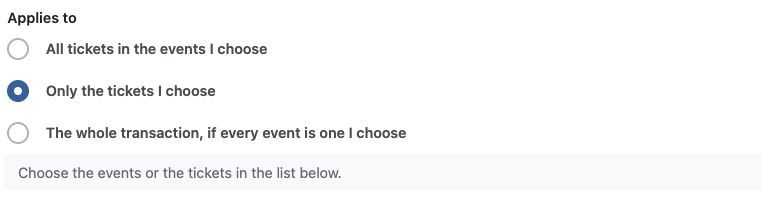
Use the specific-ticket option for PARTNER10 and the whole-transaction option for WEEKEND20.
Decide what the cart needs to qualify
SPEND500 · Set a minimum spend. Give newsletter subscribers 10% off qualifying orders of $500 or more before tax. Set a minimum order amount and choose whether to count the discounted items or the whole cart.
DINNER15 · Require another ticket. Give attendees 15% off dinner when they also buy a conference pass. Select dinner as the discounted ticket and add the conference pass as a required ticket. Set the discount to apply only to the chosen ticket so the pass stays at full price.
Give larger orders a better deal
TEAM · Offer tiers by ticket count. Set a five-ticket minimum and a 10% base discount. Add 15% from 10 eligible tickets and 20% from 20. A team buying 12 eligible tickets gets 15% off all 12.
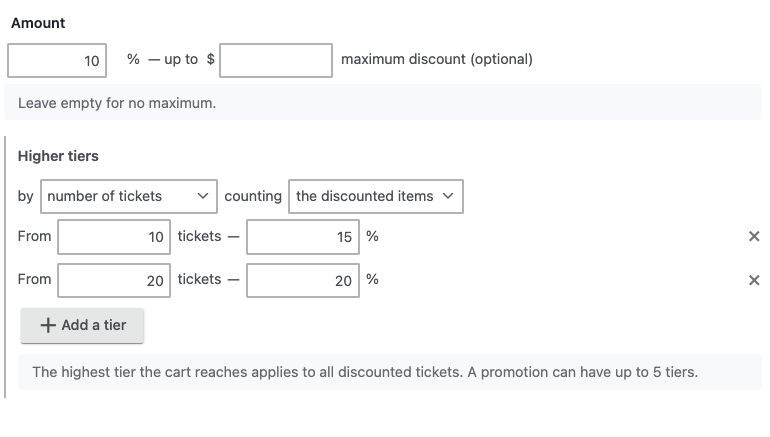
For TEAM, add the five-ticket minimum separately under Conditions.
RETURN · Offer tiers by pre-tax spend. Give returning customers $25 off a qualifying order of $300 or more before tax. At $600 before tax, the discount increases to $50. Use a minimum order amount for the first threshold and a higher tier for the second.
Check the offer before you share it
Go to Event Smart → Promotions → Add New. Choose a fixed amount or percentage, set what the promotion applies to, then add any conditions and higher tiers. You can set dates, limit uses, and cap a percentage discount. Attendees enter a code at the payment step. If you leave the code field blank, qualifying orders get the discount automatically.
Test a cart that qualifies and one that falls just short. For WEEKEND20, try adding a ticket from an event you didn’t select. For TEAM, compare nine eligible tickets with ten so you can see the rate change before announcing the offer.
You can purchase Promotions & Discount Codes à la carte or get it included with the Business plan. Follow the setup guide to get started.
Leave a Reply